Number settings
Written By CAL
Last updated 4 months ago
Under Admin > Account > Number Settings, you can set the number range for customer numbers. In the Number Ranges section, you can define how new customer numbers are structured and the starting value for number assignment.
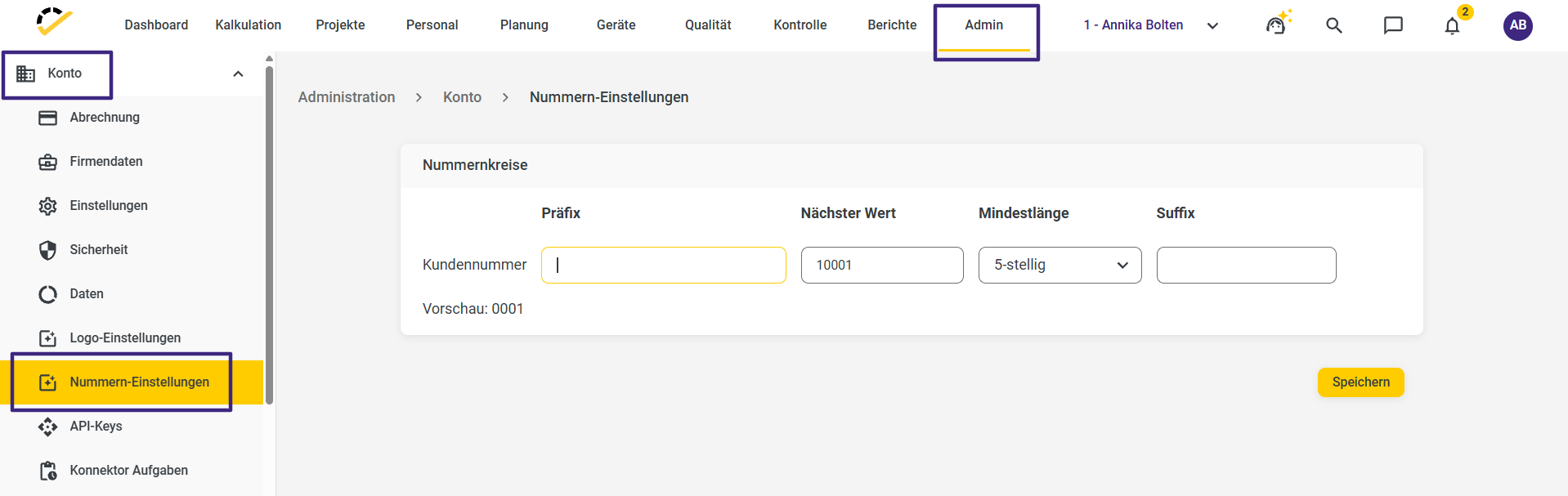
The following fields are available for the customer number: Prefix, Next Value, Minimum Length, and Suffix.
Prefix: Here you can enter a value of your choice that precedes the actual customer number. The prefix may be up to 20 characters long. Optionally, you can use placeholders that automatically insert dynamic values. You can find these via the curly brace icon or enter them directly.
Next Value: This required field determines the starting number for the next customer number. The default value for customer numbers is 10000.
Minimum length: Here you specify how many digits the customer number should have. Depending on your selection, missing digits are padded with leading zeros.
Available options: 3-digit, 4-digit, 5-digit (default), 6-digit
Suffix: Here you can optionally add an additional value after the customer number.
A customer number is automatically generated when:
a contact is selected in a quote who does not yet have a customer number
the “Customer” section is opened and activated for the first time in the contact
In both cases, the number is generated based on the defined logic and saved in the contact.
The customer number can only be edited in the contact. In documents (e.g., quote, invoice), the field is not editable.
Important Notes on Assignment
Each customer number is checked for uniqueness within the defined number range.
Customer numbers must not be assigned twice.
If a customer number has already been used and there are documents associated with it, it must not be assigned again, even if it has been deleted or the number has been changed.